AirCast Phone to TV by AirPlay
- 4.1
- Rating
- 100.00K
- Installs
- Free
- Price
 Analysis by App-foxy
I tested AirCast Phone to TV by AirPlay as a practical screen-mirroring app for Android TV, focusing not only on whether an iPhone could appear on a larger display, but also on how comfortable the process felt for different users and situations. The app comes from Delta Software and sits in the video players and editors category, although its real purpose is narrower: it acts as a bridge between an iPhone and an AirPlay-compatible Android TV.
That narrow purpose is also its main appeal. If you have an iPhone and an Android TV, you may not want to replace your television, buy an additional streaming box, or search through several complicated connection methods. AirCast gives you a direct route to try screen mirroring. It is free to install, rated for Everyone, and supports devices running Android 6.0 or later. Optional in-app purchases range from $1.99 to $4.99 per item, so I would approach it as a free starting point rather than assuming every part of the experience is permanently unrestricted.
How AirCast feels when you need to mirror an iPhone
I find AirCast most useful when the need is immediate and specific: show something from an iPhone on an Android TV without passing the phone around. The first connection is also a chance to learn whether your television and home network cooperate, so I’d try it with a harmless photo before relying on it for a gathering. Once that basic routine is clear, the more important question is whether it earns a place in your regular habits.
You May Also Like

 AccuWeather: Weather Radar
AccuWeather Review: A Quick, Clear Forecast for Everyday Decisions
For everyday plans, the best forecast is the one you can understand quickly. AccuWeather makes rain timing, radar, and local conditions easy to act on, with a few trade-offs.

 Hill Climb Racing
Why Hill Climb Racing Still Turns Crashes Into One More Run
A tiny car, a bumpy hill and one more upgrade: Hill Climb Racing keeps resurfacing because its simple chaos makes every near-miss feel personal.

 AliExpress - Shopping App
AliExpress Makes Global Shopping Feel Personal, but Shoppers Bear the Risk
AliExpress turns a global marketplace into a pocket-sized discovery engine. Its reach is useful, its shopping loop compelling, and its trade-offs easy to miss.

 Lords Mobile: Kingdom Wars
Lords Mobile Is a Kingdom-Building Routine, Not a Quick Match
A case-by-case verdict on the building, battles, device demands, and social commitments that make Lords Mobile rewarding for some players and exhausting for others.

 PDF Scanner app - TapScanner
TapScanner Makes Paperwork Easier to Capture, Check, and Share
TapScanner makes scanning with a phone feel less like a rescue operation and more like a dependable step in getting work done. Its capture tools are useful, though not flawless.

 Block Blast!
 Shows How Much a Puzzle Game Can Leave Out
A quiet grid game shows why puzzle players increasingly value instant clarity, repeatable skill and low-pressure play—and where the genre still needs to catch up.
More From Our News Desk
View All News


Readability and navigation are strongest when the setup stays simple
The first thing I noticed is that the app makes sense when viewed as a receiver rather than as a full media player. You are not opening it to edit clips, organize a library, or browse a large catalog. You are opening it because the television needs to receive what is being sent from an iPhone. That focused role helps keep the task understandable, especially for someone who finds feature-heavy streaming applications confusing.
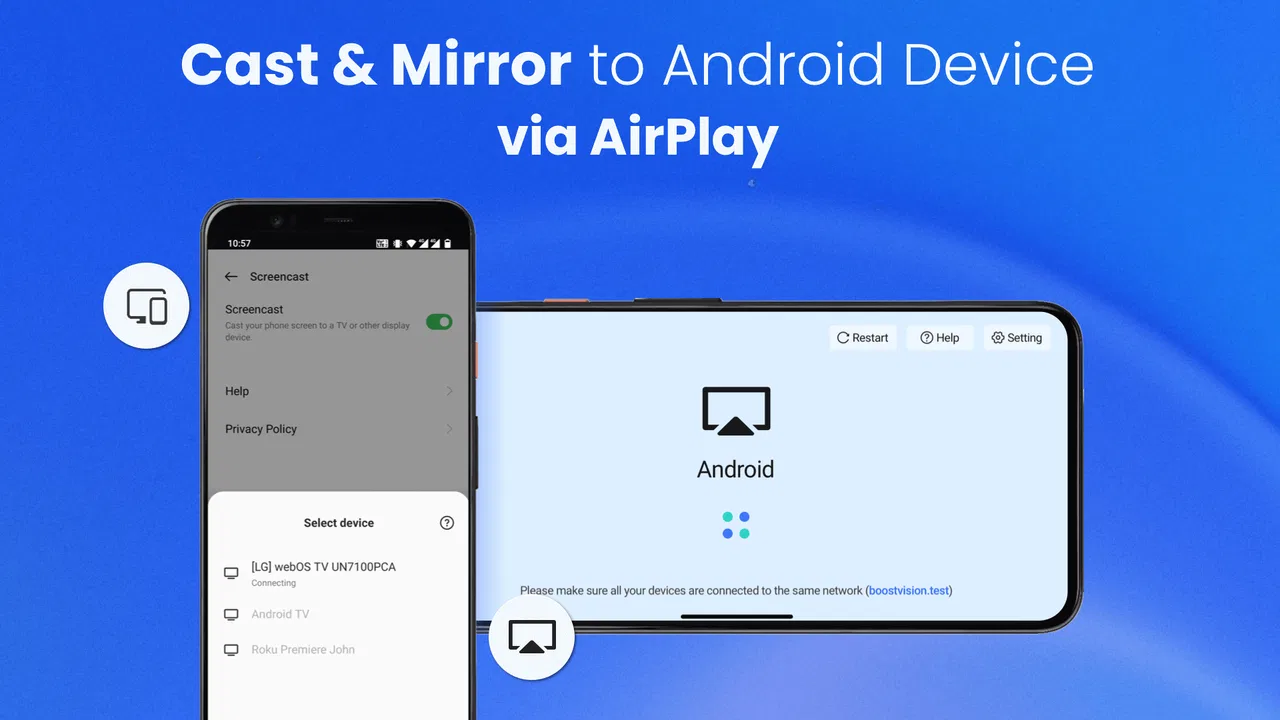
The normal workflow is best treated as a short sequence: open AirCast on the Android TV, make sure the iPhone and television are connected to the same home network, then use the iPhone’s screen-mirroring controls to look for the receiver. This is more useful than thinking of the app as a place where you select content. The iPhone remains the control device, while the television becomes the viewing surface.
For a first-time user, the most important preparation is not inside the app at all. I would check the network before troubleshooting anything else. If the phone is using mobile data while the television is connected to Wi-Fi, or if the two devices are separated by guest-network rules, the receiver may not appear. That kind of failure can feel like an app problem even when the real issue is the connection path.
The app’s store short description is simply AirCast, while its fuller purpose is iPhone-to-Android-TV mirroring through AirPlay-compatible casting. That distinction matters because someone searching for a general Android casting tool could expect broader support than this particular use case provides. I would install it specifically for an iPhone sending its display to a compatible Android TV, not as a universal answer for every phone, television, or casting standard.
In everyday use, the interface is easier to understand if you keep the television remote nearby. The iPhone starts and controls the mirror, but the TV still controls the app’s presence on the screen. This two-device arrangement can be slightly less intuitive than using a television app with its own content library. It is also why I would explain the process to a family member in advance: “Open the receiver on the TV, then start mirroring from the iPhone,” rather than telling them to search inside AirCast for a video.
Why this is useful for people who prefer a larger visual workspace
Mirroring can help when the phone display is simply too small for the task. I found the concept particularly useful for showing a photo album to several people, displaying a short video during a family visit, or making an iPhone screen visible to someone who has difficulty reading small text. The app does not change the original content, but the television can make that content easier for a group to see at once.
There is an important distinction between visibility and control. AirCast can make the iPhone’s display larger, but it does not turn the television into a touch surface. You still interact with the iPhone. For a person with limited hand movement, that may be helpful if another person can hold or operate the phone, but it may not solve the underlying control challenge for the person using the system alone.
I also would not treat mirroring as automatically ideal for long reading sessions. A large television can improve the size of text, yet phone layouts may look awkward when enlarged. Some pages remain designed for portrait use, and the distance from the sofa can make small interface elements difficult to select on the phone even though they are visible on the TV. AirCast is therefore more convincing for shared viewing and quick demonstrations than for replacing a dedicated computer display.
Motor and sensory considerations in real use
From a motor-access perspective, the app’s main advantage is that it avoids requiring the user to manipulate the television’s built-in menus for every piece of content. Once the receiver is ready, the iPhone handles the selection and navigation. That can be more comfortable for someone who is already familiar with iOS gestures and finds a television remote difficult to use.
At the same time, the process still depends on several actions that may be demanding for some people: unlocking the iPhone, opening the system controls, locating the mirroring option, choosing the receiver, and ending the session afterward. These steps are not equivalent to a single-button connection. A user with tremors, reduced dexterity, or difficulty performing precise gestures may need another person to help with the initial pairing.
The best practical workaround is to prepare the television before the viewing session begins. If I were setting this up for someone who needs assistance, I would open AirCast on the TV, place the remote within reach, and keep the iPhone charged and unlocked only when appropriate. That reduces the number of transitions and avoids making the user repeat network and receiver discovery steps while an audience is waiting.
For sensory needs, the larger display can help with visual sharing, but the result depends heavily on the original iPhone content. AirCast mirrors what is sent; it does not promise to enlarge every control intelligently or add a separate accessibility layer. If the source video has tiny captions, poor contrast, or a layout that becomes unclear when stretched across the television, the app cannot correct those design choices.
Audio is another reason to test the exact content before relying on the setup. Screen mirroring is not the same as using a native television application. I would first try the particular video, presentation, or photo sequence I plan to show, then confirm that the sound and picture behave as expected. This small rehearsal is especially valuable for users who depend on captions, visual cues, or predictable audio because a last-minute change can make the experience frustrating.
Situational access: where the app earns its place
A realistic example is a family evening in which one person has photos on an iPhone and several relatives want to see them. Passing the phone around is tiring, and people at the far end of the room may miss details. With AirCast running on the Android TV, the owner can keep the phone in hand while everyone watches the larger image. The phone remains personal and responsive, while the television becomes a shared canvas.
Another useful situation is informal support. If a friend is trying to explain an iPhone setting or demonstrate a mobile application, mirroring can let everyone follow along without crowding around a small screen. I would still avoid showing private messages, account pages, or notifications in front of a group. Mirroring duplicates the phone’s display, so anything that appears on the iPhone may become visible on the television.
It can also help in a temporary accommodation or a home where the television and phone come from different ecosystems. Many households have an iPhone but an Android TV, and buying a separate streaming device just for occasional photo sharing may feel excessive. AirCast is most attractive in that gap: the hardware is already present, and the app provides a way to connect the two sides.
For travel or public spaces, I would be more cautious. The app depends on the television being a suitable receiver and on the devices being able to discover one another over the available network. Hotel networks, shared guest Wi-Fi, and restricted public connections can prevent that discovery. In those circumstances, a wired adapter or a streaming device with a known, independent setup may be more dependable than trying to establish a temporary wireless mirror.
It is also worth separating personal viewing from professional presentations. For a quick demonstration, AirCast may be convenient. For an important meeting, classroom session, or event where delays would be costly, I would favor a tested native solution or dedicated presentation hardware. Wireless mirroring can be comfortable when it works, but the number of variables outside the app remains significant.
How it compares with the usual alternatives
The closest alternative is often a native application installed directly on the television. Native apps are usually better when the goal is to watch a supported service regularly, because they use the TV’s own controls and do not require the phone to remain active as the source. AirCast is better when the content is on the iPhone already, especially photos, a personal video, or an app screen that does not have a television version.
A physical adapter is another option. A wired connection can be more predictable and may avoid wireless discovery problems, but it adds cables, a compatible adapter, and a less flexible viewing arrangement. AirCast wins on convenience when the network and receiver are ready. The adapter wins when stability matters more than avoiding extra hardware.
Dedicated streaming boxes can offer a more polished ecosystem, with stronger integration between phone controls and television playback. They may also be preferable for frequent use or for households that want one consistent method. AirCast makes more sense when the Android TV is already installed and the need is occasional iPhone mirroring rather than a complete streaming upgrade.
Finally, simply handing the phone to another person is the lowest-tech alternative, but it fails as soon as more than one viewer needs to see the content. AirCast’s value is not that it replaces every casting method; it is that it makes a mixed-device household more workable without forcing the phone owner to upload or transfer each item first.
Remaining barriers I would consider before installing
The biggest barrier is compatibility at the receiver level. The television needs to support the type of AirPlay-compatible casting that AirCast expects. The app’s presence on an Android TV does not automatically mean that every Android TV model, firmware configuration, or network environment will behave identically. I would check the television’s capabilities and test with a non-sensitive piece of content before planning an important session.
Network discovery is the second barrier. Same-room distance does not guarantee a connection if the devices are on different network segments. A common mistake is leaving the phone connected to a guest network while the television uses the main network. Restarting both devices may help with temporary discovery issues, but it cannot overcome a router that blocks communication between clients.
Privacy deserves equal attention. Because the television reflects the phone screen, incoming messages, notifications, passwords, and private browsing content can appear in the shared view. I would enable a quiet viewing setup on the iPhone, close unrelated apps, and stop mirroring as soon as the session ends. This is not an advanced feature of AirCast; it is a sensible habit created by the nature of screen mirroring.
Performance expectations should also stay realistic. Mirroring is useful for photos, menus, demonstrations, and ordinary video viewing, but it may not feel as responsive as holding the content on the phone. Fast interactions, games, or precise demonstrations can expose delay or scaling issues. If immediate response is essential, a direct television app or wired method is the safer choice.
The free entry point makes the app easy to try, but optional purchases between $1.99 and $4.99 per item mean I would inspect the purchase screen carefully before confirming anything. I would first establish that the receiver works with my specific television and iPhone. There is little value in paying for a more comfortable workflow before solving basic compatibility and network discovery.
What the current release means for prospective users
AirCast was released on December 12, 2023, and the current version is 1.3.6. It has passed the stage of being an unknown experiment for many users, with over 100 thousand installs and an average rating of 4.1 from around 1.5 thousand ratings. Those figures suggest a recognizable level of interest, but they should not replace a test on your own television because casting behavior is unusually dependent on the surrounding hardware and network.
The Everyone content rating makes the app broadly suitable from a content-classification perspective. That does not mean every setup will be equally accessible. A person may still face difficulties with small controls, repeated gestures, network troubleshooting, or the need to operate two devices. I appreciate the distinction: a general age rating tells me about the intended audience, while the practical accessibility of the workflow depends on the user and the home environment.
Delta Software has kept the product focused on the connection between an iPhone and an Android TV rather than presenting it as a full replacement for every television feature. That focus is useful, but it also means I would not install it expecting video editing tools, a media library, or a universal casting dashboard. Its identity belongs to the moment when the content is already on the phone and the larger screen is the missing piece.
My inclusive verdict on AirCast
AirCast Phone to TV by AirPlay is most helpful when the main challenge is making iPhone content visible on an Android TV for one person or a group. I like it for family photos, quick demonstrations, informal support, and occasional shared viewing. The free installation lowers the risk of trying it, and the focused purpose is easier to explain than a large streaming application with unrelated features.
I would recommend it to an iPhone owner who already has a compatible Android TV and wants a wireless option before buying extra hardware. I would also recommend a short rehearsal: connect both devices to the intended network, open the receiver, mirror a harmless test image, check the sound and picture, and practice ending the session. That sequence answers the most important practical questions before anyone depends on it.
I would steer away from it when the television is not AirPlay-compatible, the network blocks device discovery, or the content requires perfect timing and low delay. I would also choose another method for long, private, or professionally important sessions if operating two devices creates stress. A wired adapter or native television app may be less elegant, but sometimes reliability and independent controls matter more than convenience.
My final view is positive but deliberately practical. AirCast does not remove every accessibility barrier, and it cannot make an incompatible television compatible through software alone. What it does offer is a useful bridge for a very specific mixed-device situation. When the iPhone is the source, the Android TV is the destination, and the network cooperates, it can turn a small personal screen into a more inclusive shared display without demanding a complete change of hardware.
FAQs for AirCast Phone to TV by AirPlay
01What is AirCast Phone to TV by AirPlay and what can it do?
AirCast Phone to TV by AirPlay is designed to mirror or cast content from a compatible mobile device to a television or other supported display. In practical use, it can be useful for showing photos, videos, presentations, and possibly the phone’s screen on a larger display. Its exact capabilities depend on the receiving TV, network, operating system, and the features enabled by the app.
02Which TVs and devices are compatible with AirCast Phone to TV by AirPlay?
Compatibility depends on both the app and the receiving device. It is generally intended for TVs, streaming devices, or receivers that support AirPlay, screen mirroring, or a compatible casting protocol. Before downloading, check whether your television model is supported and whether your phone meets the app’s requirements. Some older TVs may need an Apple TV, AirPlay receiver, or another compatible streaming device.
03Does AirCast Phone to TV by AirPlay require Wi-Fi or an internet connection?
A wireless network is normally required because the phone and television need to communicate with each other. In most cases, both devices should be connected to the same Wi-Fi network for discovery and stable playback. An active internet connection may not always be necessary for locally stored photos or videos, but online content still requires internet access. Mobile data alone may not provide reliable casting.
04Why can’t the app find my TV or why does screen mirroring keep disconnecting?
If the television is not detected, first confirm that the phone and TV are connected to the same Wi-Fi network and that AirPlay or screen mirroring is enabled on the TV. Restarting both devices, updating their software, and temporarily disabling VPNs can also help. Disconnects may be caused by weak Wi-Fi, network congestion, an outdated receiver, or compatibility limitations rather than the app itself.
05Is AirCast Phone to TV by AirPlay free, and are there any privacy concerns?
The app’s pricing and available features may vary by version, region, and subscription plan, so review the store listing before installing or starting a trial. Casting applications commonly request access to the local network, photos, videos, or other media needed for their functions. Read the permission prompts and privacy policy carefully, and avoid granting access that is unrelated to the features you intend to use.
Pros
- Simple setup for mirroring an iPhone or Android device
- Works with many smart TVs and streaming devices
- Useful for sharing photos
- videos
- and presentations
- Supports wireless casting without extra cables or adapters
- Clean interface makes basic casting controls easy to find
Cons
- Performance depends heavily on Wi-Fi strength and network congestion
- Some advanced features may require a premium subscription
- Mirroring can introduce noticeable delay during games or live video
- Compatibility may vary between TV brands and device models
- Ads can interrupt the experience in the free version

AirCast Phone to TV by AirPlay
Gallery